Virtual Waiting Room for Product Launches and Drops
Fair to fans, closed to bots, sold out gracefully
CrowdHandler is best for brands running limited releases where demand will outstrip supply: sneaker and apparel drops, collectibles, restocks and collaborations, sold through Shopify, WooCommerce or a custom storefront. The waiting room collects everyone before the launch, shuffles them into a random order when the sale opens, keeps bots out of the line, and can stop admitting shoppers when the stock is gone.


Fair by design
Why first come, first served fails on drop day
A conventional queue rewards whoever arrives first. On a drop that means bots, which connect in the first milliseconds, and the shoppers who have been refreshing the product page for an hour. Genuine customers who turn up at the advertised time are already at the back.
CrowdHandler handles this with a pre-queue, called countdown mode. You open the waiting room before the drop, with a branded countdown to the launch time. Nobody holds a queue position while the countdown runs, so arriving five hours early earns no advantage over arriving five minutes early. When the queue activates, everyone already in the waiting room is given a random position. Visitors who arrive after that join behind them, in the order they arrived. The mechanics are described in the queue mechanics guide.
Random allocation is fairer for a drop than first come, first served because it removes the head start that bots and page campers rely on. For always-on crash protection, where there is no advertised start time, a first in, first out queue remains the right choice. Online ballots vs queues covers a third option: a pre-registration ballot run through the same waiting room.
Bot mitigation
Bot mitigation built into the queue
Randomisation changes the economics for bot operators, but it does not stop them creating thousands of positions. CrowdHandler layers several controls on the waiting room itself, where automated traffic is easiest to identify.
- CAPTCHA at queue entry. Visitors complete a CAPTCHA before they receive a queue position, not at checkout. ALTCHA is included, and Google reCAPTCHA and hCaptcha are also supported. Standard plan and above.
- Device fingerprinting. Each position is tied to the device that earned it, so a position cannot be shared, sold or split across devices, and one position cannot be used for several orders. Standard plan and above.
- IP rules and intelligence. Block or prioritise IP ranges, auto-block IPs that open too many sessions, and opt in to blocking data centres, proxy networks, TOR exits and known attackers. The firewall is on the Plus plan and above; automated threat filtering and anomaly scoring are on Professional and above. See IP rules and the firewall.
- Anomaly detection. Every session is scored across more than 20 metrics, including geography, velocity and IP reputation, and anomalous sessions can be flagged, challenged or blocked.
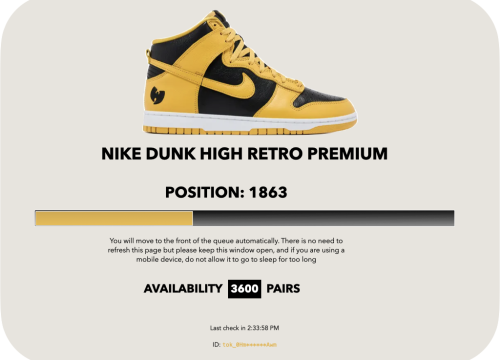
The Nike x Wu-Tang Clan Dunk relaunch shows these layers working together. CrowdHandler blocked over 200,000 bot attempts during the invitation-only pre-drop of 360 pairs, and the main drop of 3,600 pairs completed with every pair going to genuine fans despite 11 million bot attempts. The full toolkit is on the bot mitigation page, and Stopping bots: the key to a successful product drop explains the reasoning behind each layer.

Stock sync
Stop admitting when the stock runs out
Overselling and ghost stock are the other drop-day failure. Bots lock inventory in carts, shoppers see "sold out" before the product has sold, and customers who waited in line arrive at an empty shelf.
CrowdHandler's stock control attaches your product availability to the waiting room. When stock control is enabled, shoppers in the queue see how many units remain, and the waiting room can switch to a sold-out state when the count reaches zero, so the queue stops admitting shoppers once the units are gone. Checkouts are tracked too, so one queue position cannot be used to buy twice.
On Shopify the stock level syncs automatically through the CrowdHandler app. On other platforms you update the level during the sale, or build a custom integration through the API. Stock control is included on the Standard plan and above.
Setting up on Shopify, WooCommerce or a custom storefront
- Shopify. Install the CrowdHandler Shopify app, which also correlates orders with queue positions so that a bot cannot skip the queue and buy directly. The Shopify app is included on the Plus plan and above. BÉIS ran 16 Black Friday flash sales on Shopify Plus this way; the case study describes the setup.
- WooCommerce. Install the CrowdHandler plugin from the WordPress plugin directory and activate it. If your store already runs behind Cloudflare, use the Cloudflare integration instead, which runs the queue check at the edge before traffic reaches your server.
- Custom storefront. The JavaScript tag, added directly or through Google Tag Manager, gets a waiting room running in about 15 minutes. For a high-value release we recommend an edge integration on Cloudflare, AWS CloudFront or Akamai, because moving the check off the visitor's browser removes the opportunity to bypass it. If you are not on one of those CDNs, the DNS integration routes traffic through a CrowdHandler proxy with the same effect. What's the best way to integrate a waiting room? compares the options, and the integration guides cover each one.
What a merchant does on drop day, step by step
- The week before. Create a waiting room for the product URL, schedule the countdown to open ahead of the launch and the queue to activate at the exact drop time, and apply a branded template showing the product, the rules and the stock count. Set the stock level and the admission rate, switch on CAPTCHA at entry, and add any IP rules.
- Pre-access, if you offer it. Issue priority codes to loyal customers, competition winners or members so they can enter ahead of the general queue. Priority codes are on the Plus plan and above.
- Launch. The countdown reaches zero, everyone waiting is shuffled into a random order and the first shoppers are admitted at the rate you set. Each shopper sees their position, estimated wait and the units remaining.
- During the sale. Watch the dashboard. Raise or lower the rate if the store slows, or let autotune set it from live page performance (Plus plan and above). Blocked IPs and anomaly warnings are listed in the firewall view.
- Sold out. If you have set up stock control, the waiting room can switch to a sold-out message and stop admitting shoppers, so those still waiting see a clear message rather than an error page. You can point them towards the rest of your catalogue from there.
- Afterwards. Review the session and block reports, then return to the free Lite plan until the next drop. The listed plans are monthly and change instantly from the dashboard.
Why discount when you can drop? covers the marketing side of a drop. For the full plan comparison see pricing, and for the queue itself see how a virtual waiting room works.
Product launch and drop FAQ
How does a waiting room stop bots getting to the front of the queue?
Positions are allocated randomly when the queue activates, so arriving first earns nothing. Before a visitor receives a position they complete a CAPTCHA, their device is fingerprinted to the position, and their IP is checked against data centre, proxy and known-threat lists. Sessions that still look automated are scored and can be blocked.
Can the queue stop admitting shoppers when stock runs out?
Yes, if you set it up. Attach your stock level to the waiting room and shoppers see the units remaining; when the count reaches zero the waiting room can show a sold-out message and stop admitting. On Shopify the stock level syncs automatically through the app.
Does CrowdHandler work with Shopify and WooCommerce?
Yes. There is a Shopify app, included on the Plus plan and above, and a WordPress plugin for WooCommerce stores. Stores on Cloudflare, AWS CloudFront or Akamai can integrate at the edge, the DNS integration works with any platform by routing traffic through a CrowdHandler proxy, and any site can use the JavaScript tag.
How long does it take to set up a waiting room for a drop?
A basic waiting room using the JavaScript tag takes about 15 minutes and needs no software installed. The countdown, template, stock level and bot controls are all configured from the dashboard before the drop.
Do I need to pay for a plan between drops?
No. The listed plans run month to month and the Lite plan is free. You can upgrade for a launch and return to Lite from the dashboard afterwards. Starter is $290 a month, Standard $900, Plus $1,680 and Professional $4,500.
Ready for your next drop?
Start on the free Lite plan and upgrade when the launch is scheduled.