Guarding against DNS bypass attempts using the secure x-ch-no-bypass token.
Introduction
This guide explains how to protect your origin against DNS bypass attempts. Implementing the x-ch-no-bypass header is not required for any CrowdHandler integration, but it adds a layer of verification at your origin and is recommended.
Which integration types is this article relevant for?
What do we mean by DNS bypass attempts?
Integrating CrowdHandler on your CDN makes bypassing CrowdHandler checks difficult. However, a determined user who tracks down network information about your infrastructure may be able to send traffic around your CDN endpoint, skipping all of the protection it offers, including your CrowdHandler integration.
How it works
When configured, your CrowdHandler integration attaches a header named x-ch-no-bypass to every request forwarded to your application. Its value is your no-bypass token. With a small amount of code, your application checks that requests carry the header with the expected value and rejects those that don't. Only requests that have passed through CrowdHandler reach your application.
Appcelerator (DNS) with Cloudflare or Imperva in front
If your DNS points at Cloudflare or Imperva and that service forwards traffic to CrowdHandler, set the domain's Setup Type to Cloudflare or Imperva in the CrowdHandler control panel. In that mode CrowdHandler does not add its own x-ch-no-bypass header. Instead, the header you set in Cloudflare or Imperva is passed through to your origin unchanged.
Validating that value at your origin then proves a request came through both your upstream service and CrowdHandler. A request that reaches CrowdHandler directly, skipping Cloudflare or Imperva, arrives at your origin with no header and is rejected.
With Setup Type left on Direct DNS, CrowdHandler adds its own token and overwrites any same-named header it receives.
Where can I find my token?
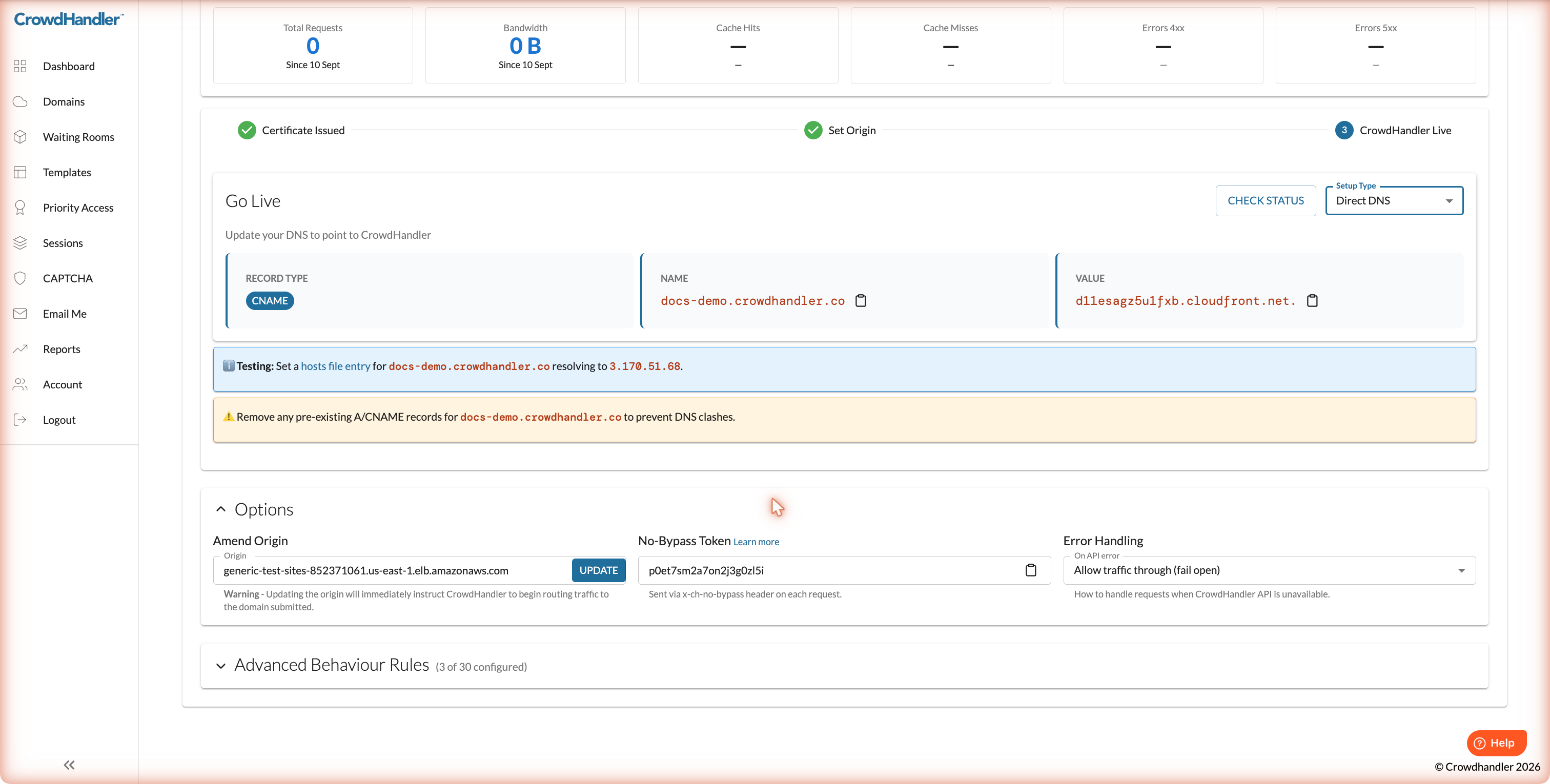
Appcelerator (DNS): open the domain's settings page in the CrowdHandler control panel and expand Options. The token is in the No-Bypass Token field.
If the Setup Type is Cloudflare or Imperva, that field reads "Relayed from Cloudflare" or "Relayed from Imperva". There is no CrowdHandler token in that case. The value to validate is whatever you configured upstream.
Other CDN integrations (Akamai, Cloudflare, CloudFront): the respective installation guide explains where the token is set. The value is one you choose.
Integration examples
Checking for the presence and value of the x-ch-no-bypass request header is straightforward in most languages and web servers. Replace YOURTOKENVALUE with your token.
Apache
RewriteEngine On

# Block if the x-ch-no-bypass request header does not match
RewriteCond %{HTTP:x-ch-no-bypass} !^(YOURTOKENVALUE)$
RewriteRule ^ - [F]
Nginx
location / {

    if ($http_x_ch_no_bypass != "YOURTOKENVALUE") {
        return 403;
    }

    proxy_pass http://app:3000/;
}
Express.js
app.get('/', (req, res) => {
    if (req.header('x-ch-no-bypass') !== "YOURTOKENVALUE") {
        return res.status(403).send("Sorry! You can't see that.");
    }
    res.sendFile(__dirname + "/views/index.html");
});
PHP
function getRequestHeaders() {
    $headers = array();
    foreach ($_SERVER as $key => $value) {
        if (substr($key, 0, 5) <> 'HTTP_') {
            continue;
        }

        $header = str_replace(' ', '-', ucwords(str_replace('_', ' ', strtolower(substr($key, 5)))));
        $headers[$header] = $value;
    }
    return $headers;
}

$headers = getRequestHeaders();

if (($headers['X-Ch-No-Bypass'] ?? '') != "YOURTOKENVALUE") {
    header("HTTP/1.1 403 Forbidden");
    exit;
}
Python (Django)
from django.http import HttpResponseForbidden
from django.http import HttpResponse

def index(request):
    ch_bypass_key = request.META.get('HTTP_X_CH_NO_BYPASS')
    if ch_bypass_key != "YOURTOKENVALUE":
        return HttpResponseForbidden()
    return HttpResponse("Hello world!")
What the header does and doesn't protect
The x-ch-no-bypass check runs at your origin, so it only applies to requests that reach your origin. Two things follow from that.
The waiting room is always enforced. CrowdHandler checks every request at the edge before anything else happens, including requests for cached content. A visitor cannot skip the queue by finding a cached copy.
Cached content skips the origin check. If a path is set to cache, the first request fetches it from your origin, where the header is validated, and later requests are served from the CDN cache without going back to your origin. So a request that skipped your CDN could receive an already-cached copy of that path. This is how every CDN cache works, not something specific to CrowdHandler. If a page must be validated on every request, leave caching off for it. For Appcelerator, that is the Cache Policy column under Advanced Behaviour Rules; new domains cache nothing by default.