Appcelerator (DNS) Implementation: URL Exclusions
Advanced Behaviour Rules let you decide, per URL pattern, whether CrowdHandler should queue requests and whether it should cache responses. They replace the URL Exclusion List from the previous version of the DNS integration.
Common uses:
- Bypass the queue for payment provider callbacks and webhooks.
- Bypass the queue for API endpoints, feeds and anything a browser doesn't load directly.
- Bypass the queue and cache static asset folders such as
/wp-content/uploads/*. - Turn caching on for a marketing site, or keep it off for anything personalised.
Where to find them
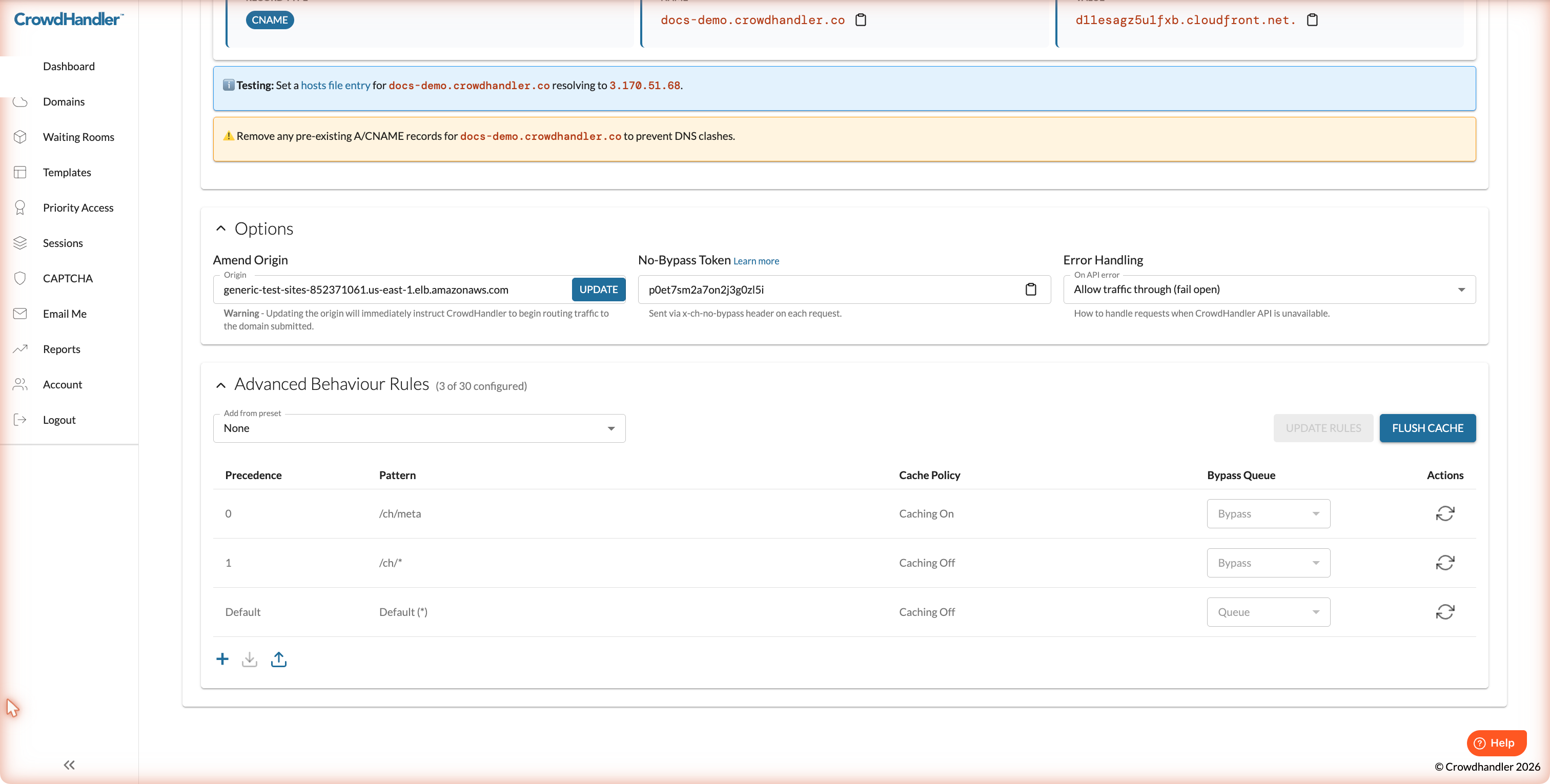
Go to Domains, open the domain's Settings, and expand Advanced Behaviour Rules at the bottom of the page.
How rules work
Each rule has:
- Pattern: the path to match (see wildcards below).
- Cache Policy: Caching On or Caching Off.
- Bypass Queue: Bypass (never queue this path) or Queue (normal waiting room behaviour).
Rules are evaluated in Precedence order and the first match wins. The Default (*) rule at the bottom catches everything else and can't be deleted. Out of the box it is set to Caching Off and Queue, meaning every request is checked against your waiting rooms and nothing is cached at the edge.
The two /ch/* rules at the top are system rules used by CrowdHandler and can't be changed.
You can have up to 30 rules per domain including the system and default rules.
Adding rules
- Click + to add a blank rule, fill in the pattern, choose a cache policy and bypass setting, then click Update Rules. Changes take a few minutes to deploy to every edge location.
- Add from preset drops in a ready-made set of rules. Static Assets caches and bypasses the queue for common file types (CSS, JavaScript, images, fonts). WordPress bypasses the queue for admin, login, cron, AJAX and REST paths and caches the uploads, themes, plugins and includes folders. You can edit or delete preset rules after adding them. Choosing None removes rules that were added from a preset.
- The upload and download icons let you export your rules as a file and import them again, which is handy for copying rules between domains.
- Flush Cache clears everything CrowdHandler has cached for the domain. Use it after deploying a change to cached content.
Caching behaviour
With Caching On, CrowdHandler honours the Cache-Control and Expires headers your origin sends. If your origin sends none, responses are cached for 24 hours. To stop a specific response being cached under a Caching On rule, send Cache-Control: no-store from your origin and the edge will hold it for no more than one second.
With Caching Off, every request goes to your origin.
Pattern syntax
Patterns follow CloudFront's path pattern format:
*matches zero or more characters.?matches exactly one character.- Patterns are case-sensitive.
*.jpgdoes not matchLOGO.JPG. - Maximum length 255 characters.
- Allowed characters:
A-Z a-z 0-9 _ - . * $ / ~ " ' @ : +and&.
| Pattern | Matches |
|---|---|
*.jpg |
Every .jpg file anywhere on the site |
/images/*.jpg |
.jpg files under /images/ and its subfolders |
/api/* |
Everything under /api/ |
*admin-ajax.php |
admin-ajax.php at any depth |
*.doc* |
.doc, .docx, .docm files |
/a??.html |
/ant.html, /abe.html |
Note that patterns match the path only. Query strings are not part of the match.