シングルページアプリケーション(SPA)の保護 - 高度な統合
この記事では、CrowdHandlerをシングルページアプリケーション(SPA)と統合し、過度なトラフィックからアプリケーションを保護するとともに、スムーズなユーザー体験を維持するためのアプローチについて概説します。この統合は、主に以下の2つのコンポーネントで構成されています:
-
CrowdHandlerのJavaScript連携で、SPAモードが有効になっています。
-
SPAを支えるAPI(または複数のAPI)を保護する、カスタマイズされたサーバーサイド統合機能。
JavaScript統合の役割は、最初の主要な保護層として機能し、ユーザーのリクエストの確認、ブラウザ内でのプロモーション状態の管理、および必要に応じてユーザーを待機室へリダイレクトすることです。
サーバーサイド統合の役割は、JavaScript統合を迂回できるほど知識のある者からシステムを守るための第2の防御層として機能すること、およびCrowdHandlerにパフォーマンス情報を提供することです。
JavaScript 統合のインストール
まず、SPAモードを有効にした状態で、当社のJavaScript統合機能をインストールします。
デフォルトでは、CrowdHandlerによるチェックは、DOMの完全な再読み込み時、つまりブラウザが強制リフレッシュされた場合、またはアプリケーションバンドルがダウンロードされる前にWebサーバーからページが初めて取得された場合にのみ行われます。SPAアプリケーションでは、これにより、ユーザーが最初にページにアクセスした後、CrowdHandlerに対して「非表示状態」になってしまうことになります。
SPAモードでは、DOMのリロードが発生したかどうかに関係なく、URLが変更されるたびにCrowdHandlerによるチェックが行われるよう、追加の機能を起動することでこの問題を解決します。これは、URLの状態を追跡し、変更が検出された際にイベントリスナーを使用してCrowdHandlerによるチェックを強制的に実行することで実現されています。
APIの保護
CrowdHandler を使用して API を保護する具体的な方法は、使用する言語やフレームワークによって異なるため、このガイドですべてのシナリオを網羅することは不可能です。NodeJS および Lambda@Edge(CloudFront)環境における具体的な実装例については、記事の最後の方にリンクを掲載しています。
1. APIリクエストのペイロードにフィールドを追加してください。
この例では、あなたがEコマースのSPAを管理していると仮定しましょう。データ取得のために呼び出されているAPIは1つだけで、そのAPIはあなたの管理下にあります。
ここでは以下の前提を置きますが、例はお客様のニーズに合わせて容易に調整可能です:
- ペイロードは、コンテンツタイプ「application/json」を使用して送信されています。
- 関心があるのは、PUT および POST メソッドの保護のみです。これには通常、「カートに追加」や「チェックアウト」などの操作が含まれ、JavaScript による統合の迂回を行う者がエンドツーエンドのジャーニーを完了できないようにするには、これで十分です。*
* すべてのAPI呼び出しやリクエストメソッドの種類を保護することに何ら支障はありません。例えば、GETメソッドに応答する負荷の高いAPIルートを悪意のある攻撃者が標的にすることを懸念している場合には、この方法が適切である可能性があります。その場合、追加のフィールドをクエリ文字列パラメータとして追加・抽出する必要があります。
フィールド
キー:sourceURL
値: location.href(または同等のもの)
キー:chToken
値: ローカルストレージ crowdhandler トークン *
*以下は、ローカルストレージからCrowdHandlerトークンを取得する簡単なサンプル関数です。my.domain.comを自分のサイトのドメインに置き換え、トークンが見つからない場合は空の文字列 "" を送信してください。これは、サーバー側のコードに対して、新しいCrowdHandlerセッションを割り当てる必要があることを通知するため、重要な処理です。
//Storage format
'{"countdown":{},"positions":{},"token":{"my.domain.com":"tok0N53DjDMpWeid"}}'
try {
  let ch_storage = JSON.parse(localStorage.getItem("crowdhandler"))
  return ch_storage.token["my.domain.com"]
} catch (error) {
  return ""
}
2. サーバーサイドのコードをインストールする
サーバーサイドコードの目的は、API の前に配置し、CrowdHandler に対してリクエストを検証してプロモーション状態を確認することです。プロモーション済みの CrowdHandler セッションを提示しない API 呼び出しは、その場で阻止される必要があります。
APIペイロードで指定した「sourceURL」の値は、CrowdHandlerへのチェックイン時に一時的なURLとして使用されます。コントロールパネルでは、APIのURLではなく、ウェブサイトのURLを保護するようにCrowdHandlerを設定しているはずです。この「sourceURL」の値を用いた一時的な書き換えにより、API呼び出しの発信元となったページがCrowdHandlerに通知されます。
CrowdHandlerトークンは、APIペイロードで指定したchTokenの値から抽出されます。
実装の詳細については、コードのコメントを参照してください。
例 -Express フレームワーク

const express = require("express");
const router = express.Router();
const crowdhandler = require("crowdhandler-sdk");
const { URL } = require("url");

// Middleware to handle CrowdHandler logic for POST and PUT methods
const crowdHandlerMiddleware = async (req, res, next) => {
  const method = req.method;

  // Check if the request method is POST or PUT
  if (method === "POST" || method === "PUT") {
    const publicKey = "YOUR_PUBLIC_KEY";
    const public_client = new crowdhandler.PublicClient(publicKey);
    const ch_context = new crowdhandler.RequestContext({request: req, response: res});
    const ch_gatekeeper = new crowdhandler.Gatekeeper(
      public_client,
      ch_context,
      { publicKey: publicKey }
    );

    let decodedBody;
    let chToken;
    let sourceURL;

    if (req.body) {
      try {
        decodedBody = JSON.parse(req.body);
        chToken = decodedBody.chToken;
        sourceURL = decodedBody.sourceURL;

        // Extract host & path from sourceURL
        let url = new URL(sourceURL);
        let temporaryHost = url.host;
        let temporaryPath = url.pathname;

        // Override the gatekeeper host and path with the sourceURL
        ch_gatekeeper.overrideHost(temporaryHost);
        ch_gatekeeper.overridePath(temporaryPath);

        // If there's a token in the body, provide gatekeeper with a pseudo cookie
        if (chToken) {
          ch_gatekeeper.overrideCookie(`crowdhandler=${chToken}`);
        }
      } catch (error) {
        console.error("Error parsing JSON:", error);
        return next(error);
      }
    }

    const ch_status = await ch_gatekeeper.validateRequest();

    // If the request is not promoted, send a 403 Forbidden response and do not proceed to the next middleware
    if (!ch_status.promoted) {
      res.status(403).send("Forbidden");
      return;
    } else {
      // If the request is promoted, save the ch_gatekeeper instance in res.locals for later use
      res.locals.ch_gatekeeper = ch_gatekeeper;
    }
  }
  // Continue to the next middleware or route handler
  next();
};

// Add the CrowdHandler middleware to the router
router.use(crowdHandlerMiddleware);

// Route handler for all request methods and paths
router.all("*", (req, res, next) => {
  // Render the view and send the HTML
  res.render("index", { title: "hello" }, (err, html) => {
    // Handle any errors during rendering
    if (err) {
      return next(err);
    }

    // Send the rendered HTML to the client
    res.send(html);

    // If the ch_gatekeeper instance exists in res.locals, record the performance
    if (res.locals.ch_gatekeeper) {
      res.locals.ch_gatekeeper.recordPerformance();
    }

    /*
     * IMPORTANT CONSIDERATION:
     *
     * The default status code sent to CrowdHandler is '200'. However, if a different status code needs to be sent,
     * it can be achieved by passing it as a parameter to the 'recordPerformance' method.
     *
     * Example:
     * chGatekeeper.recordPerformance({status: 404});
     *
     * If you are using CrowdHandler's autotune feature, it is crucial to pass accurate status codes to CrowdHandler to ensure the precision of analytics and autotune results.
     */
  });
});

// Export the router
module.exports = router;
例- Lambda@Edge
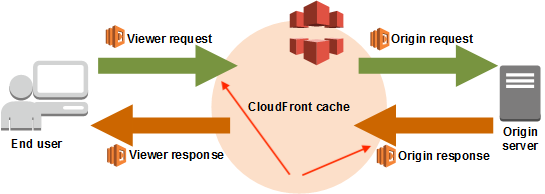
視聴者からのリクエスト
"use strict";
//include crowdhandler-sdk
const crowdhandler = require("crowdhandler-sdk");
const publicKey = "YOUR_PUBLIC_KEY_HERE";

let ch_client = new crowdhandler.PublicClient(publicKey, { timeout: 2000 });

module.exports.viewerRequest = async (event) => {
  //extract the request from the event
  let request = event.Records[0].cf.request;
  let decodedBody;
  let chToken;
  let sourceURL;

  //if the request is not a POST or PUT request, return the request unmodified
  if (request.method !== "POST" || request.method !== "PUT" ) {
    return request;
  }

  if (request.body && request.body.encoding === "base64") {
    // Decode the base64 encoded body
    decodedBody = Buffer.from(request.body.data, "base64").toString("utf8");

    // Parse the JSON encoded body
    try {
      // Parse the decoded body into a JSON object
      decodedBody = JSON.parse(decodedBody);
      //destructure sourceURL, chToken from the decoded body
      chToken = decodedBody.chToken;
      sourceURL = decodedBody.sourceURL;

      // Now you can work with the JSON object
    } catch (error) {
      console.error("Error parsing JSON:", error);

      // Handle the error or return the request object unmodified
      return request;
    }
  }

  //extract host & path from sourceURL using URL API
  let url = new URL(sourceURL);
  let temporaryHost = url.host;
  let temporaryPath = url.pathname;

  //Filter the event through the Request Context class
  let ch_context = new crowdhandler.RequestContext({ lambdaEvent: event });
  //Instantiate the Gatekeeper class
  let ch_gatekeeper = new crowdhandler.Gatekeeper(
    ch_client,
    ch_context,
    {
      publicKey: publicKey,
    },
    { debug: true }
  );

  //Override the gatekeeper host with the sourceURL
  ch_gatekeeper.overrideHost(temporaryHost);
  //Override the gatekeeper path with the sourceURL
  ch_gatekeeper.overridePath(temporaryPath);

  //If there's a token in the body provide gatekeeper with a pseudo cookie so that it can check that the provided token is valid/promoted
  if (chToken) {
    ch_gatekeeper.overrideCookie(`crowdhandler=${chToken}`);
  }

  //Validate the request
  let ch_status = await ch_gatekeeper.validateRequest();

  //If the request is not promoted, reject the request
  if (!ch_status.promoted) {
    return {
      status: "403",
      statusDescription: "Forbidden",
      headers: {
        "content-type": [
          {
            key: "Content-Type",
            value: "text/plain",
          },
        ],
        "cache-control": [
          {
            key: "Cache-Control",
            value: "max-age=0",
          },
        ],
      },
      body: "Access to this resource is forbidden.",
    };
  }

  //If the request is promoted, allow it to proceed normally
  //set customer headers for recording performance on the request before passing it through
  request.headers["x-crowdhandler-responseID"] = [
    { key: "x-crowdhandler-responseID", value: `${ch_status.responseID}` },
  ];
  request.headers["x-crowdhandler-startTime"] = [
    { key: "x-crowdhandler-startTime", value: `${Date.now()}` },
  ];

  //return the request
  return request;
};
Originの応答
const crowdhandler = require("crowdhandler-sdk");
const publicKey = "YOUR_PUBLIC_KEY_HERE";

let ch_client = new crowdhandler.PublicClient(publicKey, { timeout: 2000 });

module.exports.originResponse = async (event) => {
  let request = event.Records[0].cf.request;
  let requestHeaders = event.Records[0].cf.request.headers;
  let response = event.Records[0].cf.response;
  let responseStatus = response.status;

  //convert response status to number
  responseStatus = parseInt(responseStatus);

  //extract the custom headers that we passed through from the viewerRequest event
  let responseID;
  let startTime;

  try {
    responseID = requestHeaders["x-crowdhandler-responseid"][0].value;
  } catch (e) {}

  try {
    startTime = requestHeaders["x-crowdhandler-starttime"][0].value;
  } catch (e) {}

  //Work out how long we spent processing at the origin
  let elapsed = Date.now() - startTime;

  let ch_context = new crowdhandler.RequestContext({ lambdaEvent: event });

  //Instantiate the Gatekeeper class
  let ch_gatekeeper = new crowdhandler.Gatekeeper(
    ch_client,
    ch_context,
    {
      publicKey: publicKey,
    },
    { debug: true }
  );

  //If we don't have a responseID or a startTime, we can't record the performance
  if (!responseID || !startTime) {
    return response;
  }

  //This is a throw away request. We don't need to wait for a response.
  await ch_gatekeeper.recordPerformance({
    overrideElapsed: elapsed,
    responseID: responseID,
    sample: 1,
    statusCode: responseStatus,
  });

  //Fin
  return response;
};
3. さらに踏み込んでみると……
上記の例は、CrowdHandler によって未認証とみなされたユーザーからの API へのトラフィックをブロックするための、比較的シンプルな解決策です。
APIに直接アクセスするユーザーへの配慮や、エッジケースへの対応が必要な場合は、サンプルコードを修正して、完全な形式の待機室URLを含むJSONレスポンスを返すようにすることができます。このURLの取得方法については、JS SDKのドキュメントをご参照ください。
待合室の完全なURLが手元にある場合は、それをレスポンスに含め、クライアント側のコードで現在のURLを待合室のURLに書き換えることができます。
注意!これはクライアント側で行う必要があります。サーバー側でAPIリクエストを書き換えることは、実質的に403レスポンスを返すのと同じであり、API呼び出しがリダイレクトされるだけで、ユーザーのブラウザはリダイレクトされません。
4. まとめ
ご紹介した事例が分かりやすく、お役に立てば幸いです。ただし、アドバイスや詳細な説明が必要な場合は、専門家に相談したいとお考えになることもあるかと存じます。当社の統合担当の専門家がsupport@crowdhandler.comにて対応しており、必要に応じてサポートいたします。